Want to show your appreciation?
Please a cup of tea.
Showing posts with label WebService. Show all posts

Monday, September 08, 2008

Using WSCodeGen with Spring.Net

Since I posted the Slow Startup Performance with Spring.Net WebServiceProxyFactory about 3 weeks ago, we have made great progress towards the solution to this problem. In an earlier post, I demonstrated how to use WSCodeGen in a typical application. In this post, I'm going to discuss how we effectively used Spring.Net's configuration file to drive the WSCodeGen, a nice idea from one of my colleagues.

Using the generated client in Spring IoC container

Certainly, we can easily use the generated client in the Spring.Net to replace the WebServiceProxyFactory, but for every each Web Service client, we will have to create a definition entry in the WebServiceClient.xml file as well as an entry in the Spring.Net's XML configuration file. Taking the example in this post, we'll have something like below in the Spring.Net's XML configuration file. The WSCodeGen client can accept any property that is allowed in the ProductTemplate of the WebServiceProxyFactory, plus two dummy properties, "ServiceInterface" and "Tag", we'll use the "ServiceInterface" in the later section.

<object id="HelloWorld"
      type="Example.Client.WebService.HelloWorldClient, Example.Client.WebService">
  <property name="Timeout" value="${WebService.DefaultTimeout}" />
  <property name="EnableDecompression" value="true"/>
  <property name="Url" value="http://localhost:3586/HelloWorld.asmx"/>
</object>

It is tedious and error prone maintaining the similar configuration information in two different XML files and keeping them in sync. Wouldn't be great if we can just use the Spring.Net's configuration file only. The good news is that WSCodeGen supports any XML file as long as a proper XSLT file is also supplied to transformed it.

Eliminate the duplicated configuration

Let's take a look at the old Spring.Net's XML configuration file below that uses WebServiceProxyFactory. Thanks to the Spring's abstract object definition, I'm so glad to see that all our Web Service client definitions inherit from AbstractWebServiceClient. This abstract layer made our cut over to WSCodeGen very easy.

We have more then forty Web Service clients and I'm showing only one in the XML section below. AbstractWebServiceClient object defines an abstract template for any WebServiceProxyFactory based client. It uses AbstractWebServiceProductTemplate which in turn uses CookieContainer. The object for the "target" property of CustomViewService is an Web Service client.

Note: The AbstractXmlCarrierUnpacker is a AOP proxy we used to overcome the problem that Web Service doesn't work with ICollection<T>, IList<T> and IDictionary<T> as parameter or return type in the domain interface. Let's ignore this for now.

<object id="CookieContainer" type="System.Net.CookieContainer"/>
 
<object abstract="true" id="AbstractWebServiceProductTemplate">
  <property name="Timeout" value="${WebService.DefaultTimeout}" />
  <property name="CookieContainer" ref="CookieContainer" />
  <property name="EnableDecompression" value="true"/>
  <property name="UseDefaultCredentials" value="true"/>
  <property name="PreAuthenticate" value="true"/>
</object>
 
<object id="AbstractWebServiceClient" abstract="true"
  type="Spring.Web.Services.WebServiceProxyFactory,Spring.Services">
  <property name="ProductTemplate">
    <object parent="AbstractWebServiceProductTemplate"/>
  </property>
</object>
 
<object id="CustomViewService" parent="AbstractXmlCarrierUnpacker">
  <property name="proxyInterfaces" 
    value="Demo.Service.ICustomViewService, Demo.BizModel"/>
  <property name="target">
    <object parent="AbstractWebServiceClient">
      <property name="ServiceUri" 
        value="${WebService.IM2.BaseURL}/CustomViewService.asmx"/>
      <property name="ServiceInterface"
        value="Demo.Service.Web.ICustomViewServiceWS, Demo.BizModel"/>
    </object>
  </property>
</object>

To make the configuration change to replace WebServiceProxyFactory based client with the WSCodeGen generated client, I used WinVi32.exe, which allows me to use the regular expression as well as binary mode. I have underlined all the changes in the final XML below. The AbstractWebServiceClient becomes useless and can be deleted after all clients are converted.

<object id="CookieContainer" type="System.Net.CookieContainer"/>
 
<object abstract="true" id="AbstractWebServiceProductTemplate" 
        name="AbstractWSCodeGenClient">
  <property name="Timeout" value="${WebService.DefaultTimeout}" />
  <property name="CookieContainer" ref="CookieContainer" />
  <property name="EnableDecompression" value="true"/>
  <property name="UseDefaultCredentials" value="true"/>
  <property name="PreAuthenticate" value="true"/>
</object>
 
<object id="AbstractWebServiceClient" abstract="true"
  type="Spring.Web.Services.WebServiceProxyFactory,Spring.Services">
  <property name="ProductTemplate">
    <object parent="AbstractWebServiceProductTemplate"/>
  </property>
</object>
 
<object id="CustomViewService" parent="AbstractXmlCarrierUnpacker">
  <property name="proxyInterfaces" 
    value="Demo.Service.ICustomViewService, Demo.BizModel"/>
  <property name="target">
    <object parent="AbstractWSCodeGenClient"
      type="Demo.WSClient.CustomViewService, Demo.WSClient">
      <property name="Url" value="${BaseURL}/CustomViewService.asmx"/>
      <property name="ServiceInterface"
        value="Demo.Service.Web.ICustomViewServiceWS, Demo.BizModel"/>
    </object>
  </property>
</object>

If you are still with me so far, you may noticed that the "ServiceInterface" property of the WSCodeGen client. Since the client was generated at compile time, what is point of setting the implemented interface at the runtime time again? Good question!

Dummy properties of the generated client class

There are two dummy properties, "ServiceInterface" and "Tag", being added to each Web Service client that is created by the WSCodeGen. They are called dummy properties because their setters do absolutely nothing. The purpose of those properties is to allow us adding additional information about the client in the Spring.Net's XML configuration file so we can keep the configuration information in one place. An XSLT transformer can then easily extract those information to create the XML document needed by the WSCodeGen.

Now let's add this XSLT file that picks up all the objects inherited from AbstractWSCodeGenClient and transform them to another XML document that is understood by the WSCodeGen.

<?xml version="1.0" encoding="UTF-8" ?>
<xsl:stylesheet version="1.0" 
                xmlns:xsl="http://www.w3.org/1999/XSL/Transform" 
                xmlns:spring="http://www.springframework.net">
  <xsl:output method="xml" version="1.0" encoding="UTF-8" indent="yes"/>
  <xsl:param name="namespace">Demo.WSClient</xsl:param>
  <xsl:template match="/">
    <web-service xmlns="urn:web-service-client-configuration-1.0">
      <client-group namespace="{$namespace}" xml-namespace="http://demo.com/1.0">
        <xsl:for-each select="//spring:object[@parent='AbstractWSCodeGenClient']">
          <client class-name="{substring(substring-before(@type,','), string-length($namespace)+2)}" 
                  xml-namespace="#">
            <interface>
              <xsl:value-of select="spring:property[@name='ServiceInterface']/@value"/>
            </interface>
          </client>
        </xsl:for-each>
      </client-group>
    </web-service>
  </xsl:template>
</xsl:stylesheet>

Finally, we need to tell the VS.Net to take the Spring.Net's configuration file and transform it using the XSLT file to generate the source code. The following line should be used in the after build event of the Model project.

..\..\..\dependency\WSCodeGen\net\2.0\Debug\WebServiceClientGenerator.exe ..\..\..\src\Demo.SmartClient\app.config ..\..\..\src\Demo.WSClient\WSClient.cs ..\..\..\src\Demo.WSClient\WSClient.xsl

Your mileage may vary

The above was exactly how we integrated the WSCodeGen into our real world project. Indeed the examples are real except the true domain name is replaced by "demo.com". The XSLT was created based on our conventions illustrated below with examples.

  1. Web Services are named in PascalCase. For example, CustomViewService.
  2. Web Services are exposed as <name>.asmx. For example, CustomViewService.asmx. We actually, uses "CustomViewService.asmx" literally as object ID in our Spring.Net configuration file. Take a look at this post of how we made this possible to avoid naming conflicts.
  3. XML namespace of every Web Service starts with "http://demo.com/1.0" and followed by the name of the Web Service. For CustomViewService, it is http://demo.com/1.0/CustomViewService.
  4. Uses the Web Service name as the class name of the generated client. This is to ensure that the client name matches with the XML namespace.

The name match between 3 and 4 is essential for the XSLT to work because we use xml-namespace="#" to indicate that class name is used to suffix the XML namespace inherited from the group configuration. If you have no control to the XML namespace of the Web Services that clients are connecting to. You should consider to make user the the dummy property "Tag" of the client to embed that information in the Spring.Net configuration file.

Q&A

Questions can be posted to http://www.codeplex.com/WSCodeGen/Thread/List.aspx, or leave a comment here.

Thursday, September 04, 2008

ClickOnce Deployment + SGen Problem and The Workaround

In the post Slow Startup Performance with Spring.Net WebServiceProxyFactory, I discussed how important it is to have serialization assemblies pre-generated. In the process of achieving this goal, we found a something wrong with the ClickOnce Deployment handling the pre-generated serialization assembly. I believe this is a bug of ClickOnce Deployment.

In this post, I'm going to demonstrate how to re-produce the problem and implement a workaround for it. You can follow it step by step or if can download the source code.

Source code

All example solution source code I used in this post can be downloaded from here.

Setup the test environment

  1. Start with a new ClickOnceBug solution with a Web Service Project called ClickOnceBug.WebSerivce.
  2. Run the default Default Service1.asmx and make sure we can run HelloWorld.
  3. Add a Console Application Project called ClickOnceBug.Client to the solution.
  4. Add a Web Reference to the ClickOnceBug.Client referencing to the Service1 in the ClickOnceBug.WebSerivce project.
  5. Add a line below to the Main method of the Program class.
    Console.WriteLine(new localhost.Service1().HelloWorld());
  6. Run the client. Text "Hello World" should be printed.

Reproduce the problem

  1. This is not required to reproduce the bug, but it helps to show the impact of this bug to your ClickOnce deployed application (see this post for details). Add the XML section below to the app.config file in the Client project.

      <!--

       Never deliver your application with this.

       It fills up your temp folder in no time.

      -->

      <system.diagnostics>

        <switches>

          <add name="XmlSerialization.Compilation" value="4"/>

        </switches>

      </system.diagnostics>

  2. Double click (not expend) on the Properties folder of the Client project. In the Build tab, set the "Generate serialization assembly" option to "On".
    ClientPropertySetting
  3. Go to Publish tab, select "The application is available online only" option (again this is not necessary to reproduce the bug, it only helps to avoid the installation process when we test later). Then click on Publish Now button. The application will be built and the publish folder will open.
    ClickOncePublish
  4. Compare the publish folder and the bin\Debug folder. The ClickOnceBug.Client.XmlSerializers.dll is missing in the publish folder. This is a problem of ClickOnce deployment.
    ClientBinDebug ClientPublish
  5. If we go back to the publish tab in step 3 and click the "Application Files..." button. We'll find that the serialization assembly is listed as "Include(Auto)" although it actually failed to include. It doesn't help if we change it to "Include". If we do so, we may get build error or warning depends on other settings.
    PublishFiles

The impact

So what's the big deal of this? When we set the "Generate serialization assembly" to "On", we ask SGen utility to pre-generate XmlSerializers for our Web Service clients. Without the pre-generated serialization assembly, the XmlSerializer will need to compile a temporary assemble for each type to be XML serialized in runtime. It impacts the runtime performance. Grant Drake has a blog discusses this in depth.

Want to see it in action? Let's open the Temp folder (one easy way is go to Start->Run, enter "%Temp%" without quotation mark and click OK). Put it in detail view and sort files by date, scroll to the end of the list. Run the client application in Visual Studio and there should be no new files created in the Temp folder. Then run the "ClickOnceBug.Client.application" in the publish folder, 7 new files will show up in the Temp folder.

Workaround

Fortunately, we found that this problem only affect the application project that is being published. ClickOnce does deploy the pre-generated serialization assemblies of the dependent class library projects. Let me illustrate it step by step.

  1. Add class library project called ClickOnceBug.Workaround.
  2. Add a Web Reference to the ClickOnceBug.Workaround referencing to the Service1 in the ClickOnceBug.WebSerivce project. Similar to what we did in step 4 of the "Setup the test environment" section.
  3. Go to the Built tab of ClickOnceBug.Workaround project properties. Turn "On" the "Generate serialization assembly" option. See step 2 of the "Reproduce the problem" section for a screenshot.
  4. Add a project reference to the ClickOnceBug.Client referencing to the ClickOnceBug.Workaround project.
  5. The Web Reference in the ClickOnceBug.Client is no longer useful. Let's remove it but this is not necessary to demonstrate the workaround.
  6. Set the "Generate serialization assembly" option to "Auto" for the ClickOnceBug.Client project.
  7. Add the namespace Workaround (bolded) to the line below that we have added to the Program class earlier.
    Console.WriteLine(new Workaround.localhost.Service1().HelloWorld());
  8. Delete the ClickOnceBug.Client.XmlSerializers.dll file in the ClickOnceBug.Client\bin\Debug folder and delete everything in the publish folder.
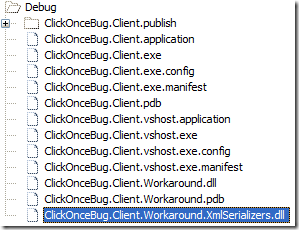
  9. Rebuild and publish the solution. We can see the ClickOnceBug.Workaround.XmlSerializers.dll is there in a sub folder of the publish location. 
     WorkaroundPublishWorkaroundBinDebug  

We can verify the effect by running the ClickOnceBug.Client.application when monitoring the Temp folder. No temporary files is generated.

Tuesday, August 26, 2008

Integrate Web Service Client Generation into Build Process

In my last post, I presented a source code generator. It creates Web Service Client source code that implements our own domain interface. In this post, I'm going to talk about how we can integrate the generator into VS.Net.

Important Update: please also read ClickOnce Deployment + SGen Problem and The Workaround if the application is deployed through ClickOnce.

The interface between human and the generator

First of all I need a way to tell the generator what clients to generate. One idea from my colleague was to use the configuration file of Spring.Net. This is a great idea if we can get it to work but here are two major problems here.

  • It's not trivial to do this when property placeholder, abstract definition, sub-context and etc come into picture.
  • This strongly couples our generator to Spring.Net. I believe the generator is useful with or without Spring.Net.

So what I need is some sort of configuration file that let me specify the clients I want to generate. My generator must be able to easily read the configuration. Being both human and machine readable, XML is naturally the choice.

Below is an example of such an XML file (You can download all source code in this blog from http://www.codeplex.com/WSCodeGen).

<?xml version="1.0" encoding="utf-8" ?>
<web-service xmlns="urn:web-service-client-configuration-1.0">
  <client-group namespace="Example.Client.WebService" 
                xml-namespace="http://tempuri.org/">
    <client class-name="MyTestClient" xml-namespace="http://tempuri.org/">
      <interface>Example.Model.IComplex, Example.Model</interface>
      <interface>Example.Model.ISimple, Example.Model</interface>
    </client>
    <client class-name="HelloWorldClient">
      <interface>Example.Model.IHelloWorld, Example.Model</interface>
    </client>
  </client-group>
</web-service>

And yes, we have schema for it.

<?xml version="1.0" encoding="UTF-8"?>
<xs:schema xmlns:xs="http://www.w3.org/2001/XMLSchema"
           xmlns="urn:web-service-client-configuration-1.0"
           targetNamespace="urn:web-service-client-configuration-1.0"
           elementFormDefault="qualified" attributeFormDefault="unqualified">
  <xs:element name="web-service">
    <xs:complexType>
      <xs:sequence maxOccurs="unbounded">
        <xs:element name="client-group">
          <xs:complexType>
            <xs:sequence maxOccurs="unbounded">
              <xs:element name="client">
                <xs:complexType>
                  <xs:sequence maxOccurs="unbounded">
                    <xs:element name="interface" type="xs:string"
                                maxOccurs="unbounded"/>
                  </xs:sequence>
                  <xs:attribute name="class-name" type="xs:Name" use="required"/>
                  <xs:attribute name="xml-namespace" type="xs:anyURI"/>
                </xs:complexType>
              </xs:element>
            </xs:sequence>
            <xs:attribute name="namespace" type="xs:Name" use="required"/>
            <xs:attribute name="xml-namespace" type="xs:anyURI"
                          default="http://tempuri.org/"/>
          </xs:complexType>
        </xs:element>
      </xs:sequence>
    </xs:complexType>
  </xs:element>
</xs:schema>

Now our generator has grown from a single class to a console application project that takes an XML file and generates the Web Service client source code. With this enhancement, we can start to integrate with VS.Net.

VS.Net integration

I wish I could implement a VS.Net plug-in and/or template that it generates a Xyz.Designer.cs file based on an Xyz.xml (or may be a fancier one, Xyz.xwsc) file. Paulo Reichert's has a nice blog on this. I think I can implement what he described relatively quick. But the manual installation process of the plug-in kept me away from this solution. We have developers come and go and I don't want to be the one to answer questions like why this is not working for me. I guess I'll leave it aside until somebody is kind enough to tell me how to create an installer shell for it.

An easier, and actually also flexible approach is to make use of the VS.Net's build events. We can call the generator to generate the code in one of those build events to create the source file and then continue the build process. This worked pretty well for me and it also give a way to integrate with Spring.Net's XML configuration file. The generator command line takes an XSLT file that can be used to transform the XML configuration file to our Web Service client definition file. I'll cover the command line option in later section. Let's look at how it is setup in the example solution that you can download from http://www.codeplex.com/WSCodeGen. (Update 9/4: The example solution is updated with an additional project to workaround the ClickOnce Deployment problem)

The example solution consists of three projects illustrated in the following pictures. I think this is a simplified solution setup for most of the real world applications. If the application has only one project, I believe it is small enough to just write the clients manually.

 ExampleModel  ExampleClient  ExampleServer

We have the domain objects and interfaces defined in the Example.Model project. Both Example.Client and Example.WebService reference to Example.Model.

At the server side, you can find the HelloWorld Web Service that implements IHelloWord interface, and MyTestSerivce that implements both IComplex and ISimple interfaces.

At the client side, we created the WebServiceClient.xml file and a dummy WebServiceClient.cs file to start with. Creating the dummy file and have it included in the project is important so that the Example.Client will compile the generated clients. The XML is exactly was what I posted above.

Here comes the work horse. In the Build Events tab of the Example.Model project properties. We added command line below (in one line) to the post-build event.

$(SolutionDir)build\WebServiceClientGenerator\Debug\WebServiceClientGenerator.exe $(SolutionDir)example\Example.Client\WebService\WebServiceClient.xml

PostBuild

Rebuild the application and we should see that the WebServiceClient.cs file now contains the generated source code. Add code below to Program.cs and enable XmlSerializer diagnose in App.config.

static void Main(string[] args)
{
    IHelloWorld helloWorld = GetHelloWorldClient();
    Console.WriteLine(helloWorld.SayHello("WSCodeGen"));
    Console.ReadLine();
}
 
static IHelloWorld GetHelloWorldClient()
{
    HelloWorldClient helloWorld = new HelloWorldClient();
    helloWorld.Url = "http://localhost:3586/HelloWorld.asmx";
    return helloWorld;
}

Let's start the Example.WebService followed by the Example.Client. We can see that the temporary assembly along with other temporary files are created by XmlSerializer in your %TEMP% folder. This is because we haven't tell VS.Net to pre-compile the XmlSerializer.

The last step is to open the Build tab of the Example.Client project's properties. Change the "Configuration" to "All Configurations" and then change the "Generate serialization assembly" option to "On". Delete those generated files and run Example.Client again. In the mean time, monitor the %TEMP% folder, we should see no files are generated. Great!

ClientPropertySetting

Command line parameters

For the folks want to go beyond what was demonstrated in the Example solution, there are the command line parameters that you can use with the generator. Run the generator without any parameter will give you the usage help below.

Usage: WebServiceClientGenerator DefinitionFile [SourceFile] [XslFile]
    DefinitionFile:
        The XML definition file describes what Web Service clients to generate.
        If the XslFile is provide, the definition  file  is  transformed  using
        XSLT.
    SourceFile:
        Specifies the full path of the source file to be generated. If the file
        extension is not given, the default  source  file  extension  is  used.
        If this parameter is omitted,  default  to  the  definition  file  with
        extension replaced by the default source file extension.
    XslFile:
        If present, the definition file is transformed using this XSLT file.

I haven't gotten a chance to test it but theoretically, you should be able to pass a Spring.Net XML configuration file as the "DefinitionFile" and provide an XSL file to create the final definition file.

Future enhancement

I have started this as an open source project at http://www.codeplex.com/WSCodeGen. More API documentation is needed and Unit Test is still missing. If anybody is willing to help, thank you and please add to the comments.

Welcome suggestions and ideas, or just encouragements of creating a plug-in and template. I'll consider if there is enough demand.

I realized that we can do the same at the server side as well. It will make the next two enhancements possible if we have control at the server side.

I would like to be able to have the client throw the real exception instead of the meaningless SOAP exception that gets thrown universally by .Net framework. This is another architecture problem I would like to resolve.

I can also integrate the ability of using IList<T> and IDictionary<K,V> in web methods, we already have a solution for this using Spring.Net AOP with our home grown carrier classes. But I believe it would be much cleaner if we can do this here.

Wednesday, August 20, 2008

Generate Fast Startup .Net Web Service Client That Implements Domain Interface

In my previous blog, I provided a manual solution to the slow startup problem of Spring.Net dynamic proxy Web Service client. And I promised that I'll continue my venture to provide a better solution for applications with a few dozens of Web Service clients.


In this blog, I'm going to show how to use CodeDom to generate the very same source code that I have posted in the manual solution.


The WebServiceClientGenerator is the class that will generate the source code of a full functional Web Service client that implements a domain interface. So that the class can be used to directly replace the WebServiceProxyFactory in the application context.


With the help of the generator class, the same MyTestClient.cs can be generate by the code below:


            new WebServiceClientGenerator(

                "Example.Client", "MyTestClient",

                typeof(IMyTest), "http://tempuri.org/"

            ).Generate("..\\..");


The next step is some how to integrate this to the VS 2005 or NAnt build process. I need some idea...


Here is the generator source code. You can find the CodeUtil class in this blog.


/// <summary>

/// Generate source code of a Web Service client that implements a given

/// interface.

/// </summary>

public class WebServiceClientGenerator

{

    #region Private Fields


    private static readonly CodeTypeReference _typeSoapHttpClientProtocol =

        new CodeTypeReference(typeof(SoapHttpClientProtocol));


    private static readonly CodeTypeReference _typeWebServiceBindingAttribute =

        new CodeTypeReference(typeof(WebServiceBindingAttribute));


    private static readonly CodeTypeReference _objectArrayType =

        new CodeTypeReference(typeof(object[]));


    private static readonly CodeAttributeDeclaration _soapDocumentMethodAttribute =

        new CodeAttributeDeclaration(

            new CodeTypeReference(typeof(SoapDocumentMethodAttribute)));


    private string _fileName;

    private string _fileExtension;

    private string _classNamespace;

    private string _className;

    private CodeDomProvider _codeDomProvider;

    private CodeGeneratorOptions _codeGeneratorOptions;

    private string _wsdlNamespace;

    private Type _interfaceType;


    #endregion


    #region Public Properites


    /// <summary>

    /// Gets and sets the namespace for the generated class.

    /// </summary>

    public string ClassNamespace

    {

        get

        {

            return _classNamespace;

        }

        set

        {

            CheckNullSetter(value);

            _classNamespace = value;

        }

    }


    /// <summary>

    /// Gets and sets the name of the generated class.

    /// </summary>

    public string ClassName

    {

        get

        {

            return _className;

        }

        set

        {

            CheckNullSetter(value);

            _className = value;

        }

    }


    /// <summary>

    /// Gets and sets the file name without extension. Default to be same

    /// as <see cref="ClassName"/>.

    /// </summary>

    public string FileName

    {

        get { return _fileName ?? _className; }

        set

        {

            _fileName = value;

        }

    }


    /// <summary>

    /// Gets and sets the file extension.

    /// </summary>

    public string FileExtension

    {

        get

        {

            return _fileExtension ?? CodeDomProvider.FileExtension;

        }

        set { _fileExtension = value; }

    }


    /// <summary>

    /// Gets and sets the interface that the generated class will implement.

    /// </summary>

    public Type Interface

    {

        get

        {

            return _interfaceType;

        }

        set

        {

            CheckNullSetter(value);

            _interfaceType = value;

        }

    }


    /// <summary>

    /// Gets and sets the namespace of the Web Service.

    /// </summary>

    public string WsdlNamespace

    {

        get

        {

            return _wsdlNamespace;

        }

        set

        {

            CheckNullSetter(value);

            _wsdlNamespace = value;

        }

    }


    /// <summary>

    /// Gets and sets the <see cref="CodeDomProvider"/>.

    /// Default is <see cref="CSharpCodeProvider"/>.

    /// </summary>

    public CodeDomProvider CodeDomProvider

    {

        get

        {

            if (_codeDomProvider == null)

            {

                _codeDomProvider = new CSharpCodeProvider();

            }

            return _codeDomProvider;

        }

        set

        {

            CheckNullSetter(value);

            _codeDomProvider = value;

        }

    }


    /// <summary>

    /// Gets and sets the <see cref="CodeGeneratorOptions"/>.

    /// </summary>

    public CodeGeneratorOptions CodeGeneratorOptions

    {

        get

        {

            if (_codeGeneratorOptions == null)

            {

                _codeGeneratorOptions = new CodeGeneratorOptions();

            }

            return _codeGeneratorOptions;

        }

        set

        {

            CheckNullSetter(value);

            _codeGeneratorOptions = value;

        }

    }


    #endregion


    #region Constructors

    /// <summary>

    /// Construct a new generator instance.

    /// </summary>

    /// <param name="classNamespace">

    /// The namespace for the class being generated.

    /// </param>

    /// <param name="className">

    /// The name of the class.

    /// </param>

    /// <param name="interfaceType">

    /// The interface to implement.

    /// </param>

    /// <param name="wsdlNamespace">

    /// The namespace of the Web Service.

    /// </param>

    /// <exception cref="ArgumentNullException">

    /// When any parameter is <see langword="null"/>.

    /// </exception>

    public WebServiceClientGenerator(

        string classNamespace, string className,

        Type interfaceType, string wsdlNamespace)

    {

        CheckArgumentNull(classNamespace, "classNamespace");

        CheckArgumentNull(className, "className");

        CheckArgumentNull(interfaceType, "interfaceType");

        CheckArgumentNull(wsdlNamespace, "wsdlNamespace");


        _classNamespace = classNamespace;

        _className = className;

        _interfaceType = interfaceType;

        _wsdlNamespace = wsdlNamespace;

    }

    #endregion


    #region Public Instance Methods


    /// <summary>

    /// Generate the source file in a directory specified by

    /// <paramref name="filePath"/>.

    /// </summary>

    /// <remarks>

    /// The name of the file is determined by the <see cref="FileName"/>

    /// property and the <see cref="FileExtension"/> property.

    /// </remarks>

    /// <param name="filePath">

    /// The directory where the source file will be generated.

    /// </param>

    /// <exception cref="ArgumentNullException">

    /// When <paramref name="filePath"/> is <see langword="null"/>.

    /// </exception>

    public void Generate(string filePath)

    {

        CheckArgumentNull(filePath, "filePath");

        string fullPath = Path.Combine(filePath, FileName + "." + FileExtension);

        using (Stream s = File.Open(fullPath, FileMode.Create))

        {

            StreamWriter sw = new StreamWriter(s);

            Generate(sw);

            //Close StreamWriter

            sw.Close();

            s.Close();

        }

    }


    /// <summary>

    /// Write out the code to the <paramref name="writer"/>.

    /// </summary>

    /// <param name="writer">

    /// The writer to where the generated code will be sent.

    /// </param>

    /// <exception cref="ArgumentNullException">

    /// When <paramref name="writer"/> is <see langword="null"/>.

    /// </exception>

    public void Generate(TextWriter writer)

    {

        CheckArgumentNull(writer, "writer");


        ICodeGenerator generator = CodeDomProvider.CreateGenerator(writer);

        CodeGeneratorOptions options = CodeGeneratorOptions;


        //Disable documentation warning

        generator.GenerateCodeFromCompileUnit(

            new CodeSnippetCompileUnit("#pragma warning disable 1591"),

            writer, options);


        // generate the code

        generator.GenerateCodeFromNamespace(

            ImplementWebServiceClient(ClassNamespace, ClassName, Interface, WsdlNamespace),

            writer, options);


        //Restore documentation warning

        generator.GenerateCodeFromCompileUnit(

            new CodeSnippetCompileUnit("#pragma warning restore 1591"),

            writer, options);

    }


    #endregion


    #region Private Methods


    // implements the web service client

    private static CodeNamespace ImplementWebServiceClient(

        string classNamespace,

        string className,

        Type interfaceType,

        string wsdlNamespace)

    {

        //Create Namespaces

        CodeNamespace codeNamespace = new CodeNamespace(classNamespace);


        //Create web service binding attribute

        CodeAttributeDeclaration webServiceBindingAttribute =

            new CodeAttributeDeclaration(

                _typeWebServiceBindingAttribute,

                new CodeAttributeArgument(

                    "Namespace",

                    new CodePrimitiveExpression(wsdlNamespace)

                    )

                );


        //Create Class Declaration

        CodeTypeDeclaration codeClass = CodeUtils.DefineClass(

            new CodeAttributeDeclaration[] { webServiceBindingAttribute },

            TypeAttributes.Public,

            className,

            _typeSoapHttpClientProtocol,

            new CodeTypeReference(interfaceType));


        // implements interface

        codeClass.Members.AddRange(ImplementInterface(interfaceType));


        codeNamespace.Types.Add(codeClass);


        return codeNamespace;

    }


    // implements all the methods defined in the interface.

    private static CodeMemberMethod[] ImplementInterface(Type theInterface)

    {

        MethodInfo[] methods = theInterface.GetMethods();

        CodeMemberMethod[] codeMethods = new CodeMemberMethod[methods.Length];

        for (int i = 0; i < methods.Length; i++)

        {

            codeMethods[i] = ImplementWebMethod(methods[i]);

        }

        return codeMethods;

    }


    // implement one web method

    private static CodeMemberMethod ImplementWebMethod(MethodInfo method)

    {

        CodeTypeReference returnType =

            new CodeTypeReference(method.ReturnType);


        CodeMemberMethod codeMethod = CodeUtils.DefineMethod(

            new CodeAttributeDeclaration[] { _soapDocumentMethodAttribute },

            MemberAttributes.Public,

            returnType,

            method.Name);


        // Define all parameters and seperate them by in/out parameter

        // type. Ref type is considered both in and out.

        List<CodeVariableReferenceExpression> inParams =

            new List<CodeVariableReferenceExpression>();


        List<OutParam> outParams = new List<OutParam>();


        foreach (ParameterInfo param in method.GetParameters())

        {

            // Determine the true parameter type

            Type paramType = param.ParameterType;

            if (paramType.IsByRef) paramType = paramType.GetElementType();


            CodeTypeReference codeParamType =

                new CodeTypeReference(paramType);


            FieldDirection direction =

                CodeUtils.DetermineParameterDirection(param);


            CodeVariableReferenceExpression codeParam =

                CodeUtils.DefineParameter(

                    codeMethod, codeParamType, direction, param.Name);


            if (direction != FieldDirection.Out) // In or Ref

            {

                inParams.Add(codeParam);

            }


            if (direction != FieldDirection.In) // Out or Ref

            {

                //outParamTypes.Add(codeParamType);

                outParams.Add(new OutParam(codeParamType, codeParam));

            }


        }


        // Calls the Invoke method on base class with all 'in' parameters

        CodeMethodInvokeExpression invokation = new CodeMethodInvokeExpression(

            new CodeThisReferenceExpression(), "Invoke",

            new CodePrimitiveExpression(method.Name),

            new CodeArrayCreateExpression(_objectArrayType, inParams.ToArray())

            );


        // Define the result variable and initialize it with the result of

        // the invoke method.

        CodeVariableReferenceExpression result = CodeUtils.DefineVariable(

            codeMethod, _objectArrayType, "result", invokation);


        // Return value and out parameter index

        int index = 0;


        // Define the return statement

        CodeMethodReturnStatement codeReturn = new CodeMethodReturnStatement();

        if (method.ReturnType != typeof(void))

        {

            // Return the result if return type is not void.

            codeReturn.Expression = new CodeCastExpression(

                returnType, CodeUtils.ArrayIndex(result, index++));

        }


        // Assign result to 'out' parameters

        foreach (OutParam outParam in outParams)

        {

            codeMethod.Statements.Add(

                new CodeAssignStatement(

                    outParam.Variable,

                    new CodeCastExpression(outParam.Type,

                                           CodeUtils.ArrayIndex(result, index++))

                    )

                );

        }


        // Add the return statement

        codeMethod.Statements.Add(codeReturn);


        return codeMethod;

    }


    private static void CheckArgumentNull(object value, string name)

    {

        if (value == null)

        {

            throw new ArgumentNullException(name);

        }

    }


    private static void CheckNullSetter(object value)

    {

        CheckArgumentNull(value, "value");

    }


    #endregion


    private struct OutParam

    {

        public CodeTypeReference Type;

        public CodeVariableReferenceExpression Variable;


        public OutParam(

            CodeTypeReference type,

            CodeVariableReferenceExpression variable)

        {

            Type = type;

            Variable = variable;

        }

    }

}


Generate Fast Startup .Net Web Service Client That Implements Domain Interface