Want to show your appreciation?
Please a cup of tea.
Showing posts with label Oracle. Show all posts

Sunday, February 12, 2012

Install Oracle 10g R2 32 bit Client and ODP.Net 10.2 on Windows 7

While the latest client is 11g, you’ll still need to install 10g R2 client before the infamous bug of ODP.Net 11.x is fixed.
Note: for x64 installation see here.

Install 32 bit Oracle 10g R2 client

This client installer only include ODP.Net for .Net 1.x framework. Download Oracle Database 10g Client Release 2 (10.2.0.3) (10203_vista_w2k8_x86_production_client.zip) from http://www.oracle.com/technetwork/database/10203vista-087538.html

Update (10/21/2012): What a pity that Oracle pulled off the page and download from their website. If you are still lucky, you can get a copy here: http://www.4shared.com/zip/ydP657yQ/10203_vista_w2k8_x86_productio.html

Unzip and run setup.exe in the install sub folder. Follow the instructions to install “Runtime” to a specific folder and give a name. I used
  • Name: OraClient10g_home32
  • Path: D:\oracle\product\10.2.0\client_32

Install 32 bit OPD.Net for .Net 2.0

Download Oracle 10g Release 2 ODAC (ODAC1020221.exe) from http://www.oracle.com/technetwork/database/windows/downloads/utilsoft-087491.html
Do not run the exe, instead use 7-zip or other zip utility to unzip it to a folder.
Go to the install sub folder in the unzip location.
Edit oraparam.ini file to add 6.1 to the end of certified windows version list, and save.
[Certified Versions]
#You can customise error message shown for failure, provide value for CERTIFIED_VERSION_FAILURE_MESSAGE
Windows=4.0,5.0,5.1,5.2,6.0,6.1
run the setup.exe file.
Select to install “Oracle Data Access Components 10.2.0.2.21”
In the “Specify Home Details” step, enter the path to the previously installed 32bit Client: D:\oracle\product\10.2.0\client_32
In the “Available Product Components”, select only “Oracle Data Provider for .Net 2.0 2.0.2.20”
Then take the default and finish installation.

32 bit assembly redirect

If you want existing assemblies that depends on older version of Oracle.DataAccess to use the this version, you need to add below assembly redirect to machine.config file under C:\Windows\Microsoft.NET\Framework\v2.0.50727\CONFIG for .Net 2.x-3.x and C:\Windows\Microsoft.NET\Framework\v4.0.30319\Config for .Net 4.x.
    <runtime>
        <assemblyBinding xmlns="urn:schemas-microsoft-com:asm.v1">
            <dependentAssembly>
                <assemblyIdentity name="Oracle.DataAccess" publicKeyToken="89b483f429c47342" culture="neutral" />
                <bindingRedirect oldVersion="9.0.0.0-10.65535.65535.65535" newVersion="2.102.2.20"/>
            </dependentAssembly>
        </assemblyBinding>
    </runtime>

Wednesday, February 08, 2012

Install Oracle 10g R2 Client and ODP.Net 10.2 on Windows 7 64bit

11g is the only official ODP.Net on Windows 7 64bit. But we’ll still need 10g R2 client before 11g’s infamous bug is fixed.

64bit Client

Download Oracle Database 10g Client Release 2 (10.2.0.4) (10204_vista_w2k8_x64_production_client.zip) from http://www.oracle.com/technetwork/database/10204-winx64-vista-win2k8-082253.html

Update (10/21/2012): What a pity that Oracle actually pulled off the page and download. If you a lucky, you can find a copy here: http://www.4shared.com/zip/naYhO1uh/10204_vista_w2k8_x64_productio.html

unzip and open Command Prompt and change directory to the unzipped location. run:
setup.exe –ignoreSysPrereqs

Note: If you still got OS version error when starting the setup. Edit install\oraparam.ini file to add 6.1 to the end of certified windows version list, and save. Then just run setup.exe without parameter.
[Certified Versions]
#You can customise error message shown for failure, provide value for CERTIFIED_VERSION_FAILURE_MESSAGE
Windows=4.0,5.0,5.1,5.2,6.0,6.1
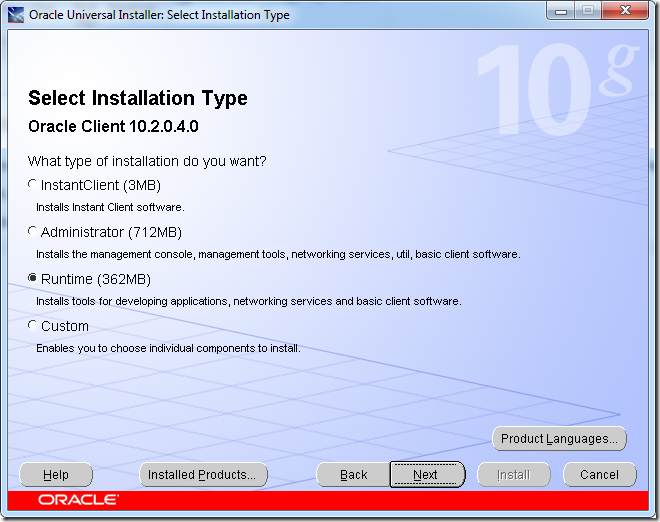
Select “Runtime” for installation type
w710g-installation-type
Change the installation location to where you wish and continue with default options to finish installation.
This comes with Oracle.DataAccess 2.102.4.0 for x64 platform. If you want existing assemblies that depends on older version of Oracle.DataAccess to use the this version, you need to add below assembly redirect to machine.config file under C:\Windows\Microsoft.NET\Framework64\v2.0.50727\CONFIG for .Net 2.x-3.x and C:\Windows\Microsoft.NET\Framework64\v4.0.30319\Config for .Net 4.x
   <runtime>
      <assemblyBinding xmlns="urn:schemas-microsoft-com:asm.v1">
       <dependentAssembly>
         <assemblyIdentity name="Oracle.DataAccess" publicKeyToken="89b483f429c47342" culture="neutral" />
         <bindingRedirect oldVersion="9.0.0.0-10.65535.65535.65535" newVersion="2.102.4.0"/>
       </dependentAssembly>
      </assemblyBinding>
   </runtime>

32bit Client

If you want to run 32-bit .Net application that uses ODP.Net, you’ll have to install 32bit client as well. One of such application is Visual Studio’s build in development web server – Cassini.
Note: there are workarounds running development web server in 64-bit.

Install 32 bit Oracle 10g R2 client and ODP.Net 10.2

Following the instructions here.

Fix the PATH

After both x64 and x86 version of clients are installed, Oracle sets both versions of bin folder to PATH. This could be an issue for either 64bit or 32bit application depends on the order of clients installed. To fix this problem, follow the instructions here: http://realfiction.net/go/153. That page was for 11g but the concept applies to 10g installation as well.

Monday, April 27, 2009

How to Populate ODP.Net ClientId When Spring.Net ADO is in Use

This post is long overdue but here we go.

One nice benefit of using Spring.Net's abstraction for ADO.Net data access is that I no longer need to write boiler plate code and never worry about connection leaking when someone forgets to close the connection object. But the problem this brought was that I could no longer set the CLIENT_IDENTIFIER in Oracle database as now Spring.Net is responsible for opening and closing the connection.

With help of Mark Pollack, I started with an wrapper of IDbProvider. Spring already provided DelegatingDbProvider (Kudos to Spring.Net team) so this indeed very easy.

    public class CurrentPrincipleToOracleClientIdDbProvider : DelegatingDbProvider
    {
        public override IDbConnection CreateConnection()
        {
            OracleConnection conn = (OracleConnection) TargetDbProvider.CreateConnection();
            conn.ClientId = Thread.CurrentPrincipal.Identity.Name;
            return conn;
        }
    }

with below configuration.

  <object id="DbProvider" type="Example.CurrentPrincipleToOracleClientIdDbProvider">
    <property name="TargetDBProvider" ref="TargetDbProvider"/>
  </object>
  
  <db:provider id="TargetDbProvider" provider="OracleODP-2.0" connectionString="${ConnectionString}"/>

Well, it didn't work, you cannot set the ClietnId when the connection is not open. Fine, let's open it.

            OracleConnection conn = (OracleConnection) TargetDbProvider.CreateConnection();
            conn.Open();
            conn.ClientId = Thread.CurrentPrincipal.Identity.Name;

Nope, doesn't work either. Although the CLIENT_IDENTIFIER was set correctly this time, but exception was thrown by the Spring.Net framework code complains that the connection is already opened when it tried to open. OK, now I know that IDbProvider.CreateConnection() works differently than Java's DataSource.getConnection().

Stuck? After digging around the members of OracleConnection class. I realized that it actually inherits from DbConnection which has an event called StateChange and Reflector tells that it actually raises events. Great, let's add an event handler.

    public class CurrentPrincipleToOracleClientIdDbProvider : DelegatingDbProvider
    {
        public override IDbConnection CreateConnection()
        {
            OracleConnection conn = (OracleConnection) TargetDbProvider.CreateConnection();
            conn.StateChange += StateChangeEventHandler;
            return conn;
        }

        private void StateChangeEventHandler(object sender, StateChangeEventArgs e)
        {
            if(e.OriginalState == ConnectionState.Closed && e.CurrentState == ConnectionState.Open)
            {
                OracleConnection conn = (OracleConnection)sender;
                conn.ClientId = Thread.CurrentPrincipal.Identity.Name;
            }
        }
    }

Now it works!

Update: If you user Spring.Net, here is any easy way out.

Let Oracle Know the Real User of ADO.Net application When Using Connection Pool

When using connection pooling, all connections are made with a fixed user name. In the database, it is difficult to tell who is the real user that is updating the database. While I can pass the user name to every stored procedures, it will be extremely tedious when multi-level of stored procedure call and still won't work for triggers.

The solution to this problem is to set the user name in some sort of database session state storage. For Oracle database, that is the CLIENT_IDENTIFIER variable in USERENV of the SYS_CONTEXT. You can set this variable by calling a build in package procedure dbms_session.SET_IDENTIFIER and retrieve it with SYS_CONTEXT('USERENV', 'CLIENT_IDENTIFIER').

ODP.Net provide a convenient property, OracleConnection.ClientId, for this. It further reset ClientId automatically before the connection is returned back to the pool.

More information about this topic can be found here.

This same technique can be used with any database that provide some kind of database session storage, and in many databases, the temporary table can serve the same purpose.

For project that are required to run on different databases. A custom stored procedure can be used for this purpose and implementation can be vary. Actually, even with the case of Oracle, we end up used a package because

  1. We can set more information then just CLIENT_IDENTIFIER. For example, the name of application, the client machine name and etc.
  2. We caches those information in a package variable for fast access, package variable is 100 times faster then SYS_CONTEXT('USERENV', 'CLIENT_IDENTIFIER'), which is about the same speed as the build in function USER (we cache USER as well in package variable).

In my next post, I'll discuss how to set the ClientId when Spring.Net ADO support is used to manage the connections.

Saturday, April 25, 2009

Converting Oracle Interval Data Type to Seconds

I have been searching for a solution to convert oracle Interval data type to number type of seconds. To my double surprise: a) Although I know Oracle is database that full of holes and patches, but still surprised that it didn't provide such a basic function; b) this time Google failed to find a solution for such a common request. Tom actually had to write up a sum function for interval. The closest that fit my need is this one, which uses below technique to get seconds.

(TRUNC(SYSDATE) + the_interval - TRUNC(SYSDATE)) * 86400 AS seconds

But that has two major problems:

  • It is rare but can happen that the first sysdate returns day1 23:59 and second sysdate returns day2 00:00. Of course this gives you completely wrong result. See update below.
  • It loses the fraction of seconds.

After given a few tries, I settled on below expression:

(SYSDATE + the_interval*86400 - SYSDATE) AS seconds

This returns accurate result with factions preserved. There are chance that the 2nd sysdate is one second more to the first sysdate but that only change result by 1/86400 second which I don't really care at this moment.

The sysdate can actually be replaced with any date column, variable or to_date('1-jan-1900') to eliminate the 1/86400 second error.

Update (4/28/09): Shammat made a very good point that the SYSDATE provide read consistency inside a single SQL statement. Thus my comment about "off by one day" was wrong. But the read consistency is not there in PL/SQL, thus please make sure assign SYSDATE to a variable and then use that variable instead.

Monday, April 13, 2009

ODP.Net Batch Update With Spring.Net

One of the many important missing pieces of ADO.Net is the inability to do the batch SQL. ADO.Net 2.0 patched in a cheesy batch update support for DataSet only so that when the number of changed rows exceeded certain limit, you get a database exception, not sure about SQL Server but this is at least true for both build in Oracle client and ODP.Net. Bear in mind that this is a pure Microsoft's design flaw by missing out this important feature in their API. It is NOT Oracle's problem. Oracle batch SQL has been working perfectly fine in JDBC world for many many years. In this post, I'm going to share with you a way to make it work with ODP.Net in one use case scenario.

Project Background

Our project uses Spring.Net framework. In the data access layer, we make mixed use of NHibernate and Spring ADO support. Thus all my code here are based on Spring.Net ADO, if you are not familiar with Spring.Net, you can at least read next section so that 1) there is information for about ODP.Net batch in general; and 2) you get to know some of many benefits that Spring.Net brings.

Inception

I have been watching code like below in our project again and again. It loops through a list of value objects and calls AdoTemplate one at a time. This yielded extremely slow performance. In one scenario, it inserted 717 rows in 7.9s.

Slow loop insert example
        public int SaveXyzDetail(IList<Xyz> xyzList)
        {
            string sql = RetrieveSQL("SaveXyzDetail");
            foreach (Xyz xyz in xyzList)
            {
                IDbParameters param = CreateDbParameters();

                param.Add("pxyzId", DbType.Int32).Value = xyz.XyzId;
                ......
                return AdoTemplate.ExecuteNonQuery(CommandType.Text, sql, param);
            }
        }


Obviously, we need to batch those SQL to database for optimal performance. But after looking around the Spring.Net's API as well as ADO.Net's API, to my surprise, there is pretty much nothing out there to help in this situation.

Eventually, I started to look into the extensions that ODP.Net provides. Thanks to Oracle, ODP.Net does provide two ways to execute batch SQL with limitations. One way is to bind the .Net array to PL/SQL associative arrays in stored procedure or PL/SQL block. You execute the stored procedure once to have all the values in the array send to database. Another way is to bind .Net arrays to regular SQL command parameters, you still execute the command once, but ODP.Net automatically create a prepared statement, loop through the arrays, execute the prepared statement multiple times but sending them all in a batch. Both has limitation that you cannot mix different SQL commands in one batch. But it is still a perfect solution to my problem. In the example above, we do execute the exactly same SQL many times in the for loop.

Extension Method to AdoTemplate

While the solution is promising, certainly I don't want to see the ODP.Net proprietary extension and type casting code all over the data access layer. The best is to have Spring.Net API to support this but unfortunately I cannot wait for it to come true and there doesn't seem to be any plan for that. NHibernate has batch support to SQL Server database by hacking the ADO.Net API, but support for Oracle database is still missing. May be they can consider to use of ODP.Net feature I mentioned above.

This is where the extension method come to handy. Hey, we can extend the AdoTemplate or may be better IAdoOperations. Let's extends it with the method below.

Extension Method Signature

1:   public static int ExecuteNonQuery<T>(
2:     this IAdoOperations operation,
3:     CommandType cmdType,
4:     string cmdText,
5:     ICollection<T> data,
6:     Converter<T, IDbParameters> dataToParameters)

I'm not going to explain the first two parameters which are common to all the ExecuteNonQuery methods. The data is a collection of value object that we are going to us as batch SQL parameters. The Converter delegate takes one value object and translate it to Spring's IDbParameters object that can be used to execute the SQL command.

The implementation takes a generic approach by using a factory pattern, so that it can be used with any other database that can provide batch support. When the extension method is called with an implementation of IAdoOperations that also implements the IBatchExecutorFactory interface, it makes use of the factory to execute the SQL in batch, otherwise it falls back to non-batch by looping through the collection and execute the command one by one. The full class can be found here.

And here is the interfaces for IBatchExecutorFactory and IBatchExecutor.

IBatchExecutorFactory

1:   public interface IBatchExecutorFactory
2: 
{
3:  
/// <summary>
4: 
/// Get an instance of <see cref="IBatchExecutor"/>.
5: 
/// </summary>
6: 
/// <returns>An instance of <see cref="IBatchExecutor"/>.</returns>
7: 
IBatchExecutor GetExecutor();
8:   }


IBatchExecutor

1:   public interface IBatchExecutor
2: 
{
3:  
/// <summary>
4: 
/// Executes batch of non queries with common command and different
5: 
/// parameters.
6: 
/// </summary>
7: 
/// <typeparam name="T">
8: 
/// The type of the data object.
9: 
/// </typeparam>
10: 
/// <param name="operation">
11: 
/// An <see cref="Spring.Data.IAdoOperations"/> object to perform
12: 
/// database updates.
13: 
/// </param>
14: 
/// <param name="cmdType">
15: 
/// The type of command.
16: 
/// </param>
17: 
/// <param name="cmdText">
18: 
/// The text of command.
19: 
/// </param>
20: 
/// <param name="data">
21: 
/// A collection of data object to be updated in batch.
22: 
/// </param>
23: 
/// <param name="dataToParameters">
24: 
/// Delegate that converts data object to parameters.
25: 
/// </param>
26: 
/// <returns>
27: 
/// The total updated count if 0 or positive. When -1 is returned,
28: 
/// it indicates that the update count cannot be obtained due the
29: 
/// the limitation of the batch implementation.
30: 
/// </returns>
31: 
int ExecuteNonQuery<T>(
32:  
IAdoOperations operation,
33:   System.Data.
CommandType cmdType,
34:  
string cmdText,
35:   System.Collections.Generic.
ICollection<T> data,
36:   System.
Converter<T, Common.IDbParameters> dataToParameters);


By now, we have extended the Spring.Net framework to support the use of batch SQL. What's left to do is to provide an implementation of IAdoOperations that uses ODP.Net batch SQL feature.

The Batch Executor for ODP.Net

To simplify the task, I decided to let the OracleOdpTemplate inherit from AdoTemplate. The class itself is straightforward, it provides a property for user to set the batch size and defaulted to 100. And it implements the IBatchExecutorFactory interface so that the extension method can detect it and obtain the batch executor from it.

The real worker is the inner class OracleOdpTemplate.BatchExecutor. Basically, it loop through all the data in the collection, calls the converter delegate to get the binding parameters for each value object, accumulate the parameter values in corresponding arrays. When accumulated rows reached the batch size, it flushes them to database using ODP.Net array binding. See the code snippet below.

Code snippet of OracleOdpTemplate.BatchExecutor
            #region IBatchExecutor Members

            public int ExecuteNonQuery<T>(
                IAdoOperations operation,
                CommandType cmdType,
                string cmdText,
                ICollection<T> data,
                Converter<T, IDbParameters> dataToParamters)
            {
                int totalRows = data.Count;
                int batchSize = _odpTemplate.BatchSize;
                if (totalRows < batchSize) batchSize = totalRows;

                int count = 0, bindCount = 0, result = 0;
                object[][] valueBuffer = null;
                
                foreach (T row in data)
                {
                    IDbParameters parameters = dataToParamters(row);
                    if (parameters != null)
                    {
                        if (valueBuffer == null)
                        {
                            valueBuffer = InitBatchParameters(parameters, batchSize);
                        }

                        string error = ValidateAndCopyParams(parameters, valueBuffer, bindCount++);
                        if (error != null)
                        {
                            throw new InvalidDataAccessApiUsageException(error + " for row: " + row);

                        }
                    }
                    ++count;
                    if (bindCount == batchSize || (count == totalRows) && bindCount > 0)
                    {
                        _bindCount = bindCount;
                        result += operation.ExecuteNonQuery(cmdType, cmdText, this);
                        bindCount = 0;
                    }

                }
                return result;
            }

            #endregion


Putting Things Together

Everything is ready so let's rewrite the example code we had in the beginning of the this post by using the extension method. We create a converter that sets the parameter values for each data object we need to insert then call ExecuteNonQuery extension method once with the list and converter.

Fast batch insert example
        public int SaveXyzDetail(IList<Xyz> xyzList)
        {
            string sql = RetrieveSQL("SaveXyzDetail");
            IDbParameters param = CreateDbParameters();

            var paramXyzId = param.Add("pxyzId", DbType.Int32);
            ......

            Converter<Xyz, IDbParameters> converter = delegate(Xyz xyz)
            {
                paramXyzId.Value = xyz.XyzId;
                ......
                return param;
            };
            return AdoTemplate.ExecuteNonQuery(CommandType.Text, sql, xyzList, converter);
        }


In addition to this, we also need to tell Spring.Net to inject the batch capable version of AdoTemplate. So we replace the AdoTemplate in the Spring.Net's configuration file with OracleOdpTemplate.

Modified Spring.Net configuration file
  <db:provider id="DbProvider" provider="OracleODP-2.0" connectionString="${DB.ConnectionString}"/>

  <object id="AdoTemplate" type="Spring.Data.Generic.OracleOdpTemplate, Spring.Extension">
    <property name="DbProvider" ref="DbProvider"/>
    <property name="BatchSize" value="${DB.MaxBatchSize}"/> <!-- number of rows -->
  </object>

  <object id="AdoXyzDao" type="Example.Dao.AdoXyzDao, Example.Dao">
        <property name="AdoTemplate" ref="AdoTemplate"/>
  </object>


Now run the test again, the same amount of rows are inserted in 0.7s with batch size of 100. That's ten times faster!

Source Code and Binary

You can find both the specific revision of source code I used in this post and binary in Google Code project. You can also get the latest source code of the SpringExtension project that this piece of function belongs to.

Updates

(4/17/2009) I have been struggling to write the unit test for this. It turned out the Spring.Net's AdoTemplate implementation doesn't use virtual. This makes extending the framework a little difficult, especially for writing unit tests.